After posting about Docoa browser a couple people suggested I try AppKiDo which looked like a decent alternative. After testing it out for a while I thought I'd post some thoughts about it.
Upon launching it, AppKiDo takes a minute and begins parsing your documentation files, unfortunately this happens EVERY time you launch it. Upon completing this the documentation browser is launched. Right away unfortunately I saw something that I wish was different, I'm sorry but the brushed metal interface should really be changed to a unified interface. I installed UNO to see how AppKiDo would look with a unified UI (yeah I know I could have probably edited the NIB file, but I was lazy here) and it definitely looks better.
AppKiDo has somewhat of an odd interface, on the left is a drawer and on the right is where you can see all the documentation and it's various attributes. The Quicklist (drawer) has some usefull attributes like allowing you to only view things like view subclasses, classes with delegates, window classes, etc. Additionally you can search for classes, methods, etc in this drawer as well.
The window itself has 3 components: (1) A Browser (optional – can be hidden) This allows you to browse up and down the various classes as well as protocols, functions,etc for specific frameworks like AppKit, Foundation, Core Data, etc. (2) Detail view – This shows you the list of functions, procols, etc of any object you have selected. It has one big advantage over Docoa Browser and Xcodes Documentation browser in that it can show you all methods for a particular class, not only the ones specifically for that class but ones that it has inherited which makes AppKiDo very powerful in this instance. (3) The Documentation Viewer itself shows you the documentation for whatever you are looking at.
Overall AppKiDo is very powerful and definitely a good documentation browser. Yet at the same time I find myself wanting to rearrange the interface, AppKiDo doesn't feel natural. I may not know what the right interface is, but at the same time I know when something is wrong. Some things like the fact that I can browse classes just for specific frameworks on the quicklist drawer, but can't do the same in the browser feels incredibly akward.
Don't get me wrong I feel AppKiDo is a very powerful application, I just feel like it's user interface is holding it back and when it's interface gets a overhaul it could very well be the perfect documentation browser.
AppKiDo can be downloaded from here: http://homepage.mac.com/aglee/downloads/appkido.html
UPDATE: One commenter informed me I indeed overlooked the preferences where the brushed metal UI can indeed to be turned off, still brushed metal really shouldn't be the default
After posting about Docoa browser a couple people suggested I try AppKiDo which looked like a decent alternative. After testing it out for a while I thought I'd post some thoughts about it.
Upon launching it, AppKiDo takes a minute and begins parsing your documentation files, unfortunately this happens EVERY time you launch it. Upon completing this the documentation browser is launched. Right away unfortunately I saw something that I wish was different, I'm sorry but the brushed metal interface should really be changed to a unified interface. I installed UNO to see how AppKiDo would look with a unified UI (yeah I know I could have probably edited the NIB file, but I was lazy here) and it definitely looks better.
AppKiDo has somewhat of an odd interface, on the left is a drawer and on the right is where you can see all the documentation and it's various attributes. The Quicklist (drawer) has some usefull attributes like allowing you to only view things like view subclasses, classes with delegates, window classes, etc. Additionally you can search for classes, methods, etc in this drawer as well.
The window itself has 3 components: (1) A Browser (optional – can be hidden) This allows you to browse up and down the various classes as well as protocols, functions,etc for specific frameworks like AppKit, Foundation, Core Data, etc. (2) Detail view – This shows you the list of functions, procols, etc of any object you have selected. It has one big advantage over Docoa Browser and Xcodes Documentation browser in that it can show you all methods for a particular class, not only the ones specifically for that class but ones that it has inherited which makes AppKiDo very powerful in this instance. (3) The Documentation Viewer itself shows you the documentation for whatever you are looking at.
Overall AppKiDo is very powerful and definitely a good documentation browser. Yet at the same time I find myself wanting to rearrange the interface, AppKiDo doesn't feel natural. I may not know what the right interface is, but at the same time I know when something is wrong. Some things like the fact that I can browse classes just for specific frameworks on the quicklist drawer, but can't do the same in the browser feels incredibly akward.
Don't get me wrong I feel AppKiDo is a very powerful application, I just feel like it's user interface is holding it back and when it's interface gets a overhaul it could very well be the perfect documentation browser.
AppKiDo can be downloaded from here: http://homepage.mac.com/aglee/downloads/appkido.html
UPDATE: One commenter informed me I indeed overlooked the preferences where the brushed metal UI can indeed to be turned off, still brushed metal really shouldn't be the default
Sunday, October 29, 2006
[Helpful App] AppKiDo

Friday, October 27, 2006
[Helpful App] Docoa Browser
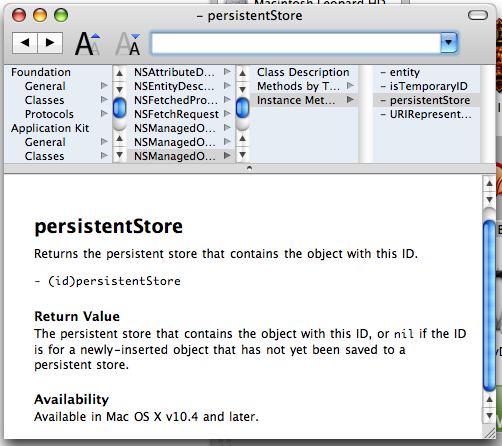 Hello everybody! I just wanted to post something you may find interesting. Docoa Browser (based on Cocoa Browser from a LONG time ago) has been updated to run on the most recent documentation from Apple!
If you don’t know what Docoa Browser is, it’s basically a slim and fast documentation browser which allows you to browse most documentation by browsing through a simple column view which you can go through very quickly. I really liked this browser before when I was first learning cocoa and I still like it today. If you find the built in documentation browser to be a bit slow at times you can give Docoa browser a try. This was just posted to the Apple Cocoa mailing list yesterday, and I was only able to download it during my Ames Mac Users Group (AmesMUG) meeting, so I haven’t had a lot of time to test it, but so far it’s worked really well.
Now to be honest this app probably won’t satisfy all your documentation browsing needs, but it should perform well for basic documentation browsing. You can download it from here (warning! this is just the source code and not a prebuilt binary so you'll have to compile it yourself): http://www.muratnkonar.com/docoafortiger/Docoa-0.3.4mnk.zip
Hello everybody! I just wanted to post something you may find interesting. Docoa Browser (based on Cocoa Browser from a LONG time ago) has been updated to run on the most recent documentation from Apple!
If you don’t know what Docoa Browser is, it’s basically a slim and fast documentation browser which allows you to browse most documentation by browsing through a simple column view which you can go through very quickly. I really liked this browser before when I was first learning cocoa and I still like it today. If you find the built in documentation browser to be a bit slow at times you can give Docoa browser a try. This was just posted to the Apple Cocoa mailing list yesterday, and I was only able to download it during my Ames Mac Users Group (AmesMUG) meeting, so I haven’t had a lot of time to test it, but so far it’s worked really well.
Now to be honest this app probably won’t satisfy all your documentation browsing needs, but it should perform well for basic documentation browsing. You can download it from here (warning! this is just the source code and not a prebuilt binary so you'll have to compile it yourself): http://www.muratnkonar.com/docoafortiger/Docoa-0.3.4mnk.zip
Tuesday, October 24, 2006
[Commentary] Thoughts on the HIG
Im working on my next tutorial which will appear soon, but for now i’d thought I’d share a few thoughts and see what you all think. Ok once again there seems to be a big topic on everybody’s minds and this time it’s the Human Interface Guidelines. Scott has some insightful commentary on this. I believe early on when I first started learning Cocoa, I took a look at this document. As far as I can remember people have been chastising Apple for not following it. Right away some things didn’t make sense like the specific types of apps that brushed metal was supposed to be used on, etc. Personally I don’t think I’ll read the HIG again anytime soon. Why? Because if you really think out a solution and take into account the users perspective while following what should be common sense, you don’t really need the HIG. Remember when your designing an app, your designing a solution to a problem so you should try and make it simple. Right away when someone looks at your app it should be very apparent what the app does and give the user a good idea of how it works. If someone has to spend a good while looking around at your app to begin to figure out these things then your solution is already too complicated, they might not be able to use everything right away but they should get the gist of it. A big pitfall of some developers is throwing too much at your user. A good example is maybe your developing a simple image edit app. If your user is typically a amateur photographer and just wants to maybe crop and do some adjustments to the image quality, do you think they’ll really need a metadata inspector window constantly showing and taking screen real estate? Of course you can suffer from the exact opposite of this and throw too little at your user to the point where they are constantly opening up things. For example Im not pro photographer but, I presume Apple did some research and decided it was a good idea for pro photographers to have access to a bunch of panels for color correction, image adjustment, metadata, etc in Aperture. Another thing I tell myself when designing UI’s is “Don’t be like the Windows developers!” Now this is not to say that all windows UI designers are crap, it’s just there are so many Windows programs I look at and go “why did they do this?” and “wtf is the purpose of this?” and so on. One of my friends who goes to Iowa State University told me in one of his classes they covered this new Windows framework (who’s name escapes me at the moment, I think it’s the windows presentation framework or something like that) that can make all these magical UI effects. He was in a group and they were designing a UI which I believe was a login window or something like that. Should be simple right? Well they wanted to have a paper clip dance around the window and have other visuals. My friend (evidently being the only sane person in the group) didn’t like this idea. Around this time the teacher came by, now you think anybody who was sane would chastise the group for putting up such a dumb idea that wastes so much resources on something so simple. But the teacher thought it was a good idea. Now I should issue a disclaimer that not all teachers at ISU are like this thankfully. So in conclusion here are the basic points
- Identify what the problem is your solving
- Define everything you require to solve the problem
- Don’t throw everything at once to the user, define the common tasks your users will be performing on the app and design around that (but allow them to get to the more complicated parts easily if they need to get to them)
- Design everything around the basic purpose of your app
- Go for the simplest solution first (you’ll get more done faster and your users will love your app because they can get things done faster) even if it takes a little bit of trial and error to find what that is “the simplest solution is usually the most elusive” - Jonathan Ive (may not be exact quote, I can’t find my iMac movie)
- Don’t waste resources on things you really don’t need in your app.
Monday, October 16, 2006
Coming Soon...
Sorry I haven't written for a little bit, first I was surprised that I was picked up by CocoaDevCentral and then I kept spending lots of time working on AssignmentTracker X. The Good news is im planning on an expansion into the LicenseKeeper app and will show you how to auto sort items in Core Data and always restore the length of columns the user sets them to in tables, and maybe a couple other little things if I get around to it. It's just an easy one to get me back on track of writting here more. For now I must work on getting AssignmentTracker X 2.0 Beta 1 out the door then I'll write here.
Monday, October 09, 2006
Holy Crap I've been picked up by CocoaDevCentral!
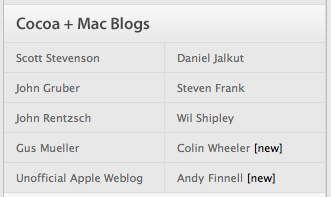 I was taking a random look at the performance of my sites and realized I never looked at how my brand new blog Cocoa Samurai is doing. When I saw the chart I saw a huge surge of visitors to the page, when looking at where the visitors where coming from I saw CocoaDevCentral on the list. When I visited the page I saw my name right next to Wil Shipley.
Friday, October 06, 2006
[Commentary] Cocoa vs. Carbon
Wil Shipley seems to have started what eventually would become a big rolling snowball with his entry linked in my previous entry. It's gotten Daring Fireball and Scott Stevenson talking. What's going on here is a grievance against the fact that several frameworks Cocoa programmers must use are only available in Carbon. Why is this a big grief? Carbon frameworks are written in procedural C style language which is a big departure from the object oriented style of Objective-C. The reason I prefeer Cocoa/Objective-C myself is because it's so easy to use and get straight to what you want. A good starting example of this is CTGradient which I am using for various elements in AssignmentTracker X currently. CTGradient is an Objective-C wrapper around Core Graphics (which is written is Carbon/Procedural C) and because of that I can write a couple lines of code and be done with it. To be specific heres a short example of a NSView subclass using CTGradient copied straight from AssignmentTracker X's 2.0 source code
@implementation ATXStartupWizardBackgroundView - (id)initWithFrame:(NSRect)frame { self = [super initWithFrame:frame]; if (self) { swGradient = [[CTGradient unifiedNormalGradient] retain]; angle = 90; } return self; } - (void)drawRect:(NSRect)rect { [swGradient fillRect:rect angle:angle]; } @endsimple and really easy! All you have to declare in the header is a CTGradient instance and a float for the angle, and if you take a look at the CTGradient source code... well it's doing a lot for you for such a simple function of creating a simple gradient grafted onto a NSView. In fact way more than I'd ever want to begin to show you here, just download it and take a look at it for yourself and you'll get an idea of why if this is a lot for just a gradient, it must be a ton for other functions. It's not that C is crap, far from it. I still continue reading through The C Programming Language 2nd Edition written by Denis Ritche himeself and appreciate a lot of things in C. C is a good programming language but in some instances like it's used in Carbon, it clearly shows it's limits. Heres something that's never really been said yet (at least not directly), when your going from Cocoa to Carbon your literally thrown from one world to another. When your in Cocoa your relatively familiar with the bounds, limits and expected behaviour of cocoa world, then suddenly your thrown into the land of procedural programming. At the very least Apple should be aware this severely limits the learning curve for new programmers or even Cocoa veterans who have never touched Carbon before and thus limits the productivity of the mac developer community as a whole. I have to agree with Wil Shipley here in that regardless of Carbons origins it's only been used as a compatibility library and really to help all the Mac programmers out there we need to move all the frameworks to Cocoa. When they are all moved to Cocoa, Apple can do all the optimizing on the backend and provide us with an easy Objective-C interface on the frontend in a similar way that they did with Core Data, thus reducing the amount of code in all apps, increasing programmer productivity, and allowing more of the devleoper community to show off all the great stuff in Mac OS X.
Thursday, October 05, 2006
[Links] Cocoa vs Carbon & Searching with Google Code
Wil Shipley on Carbon vs Cocoa Our good friend Wil Shipley has written up a good article on why some frameworks desperately need to be moved from Carbon to Cocoa: http://wilshipley.com/blog/2006/10/pimp-my-code-part-12-frozen-in.html Scott Stevenson on searching for code with Google Code Scott Stevenson has written up a good starter intro to searching for code under specific programming languages and licenses: http://theocacao.com/document.page/312 Moved to Blogger Beta If you get all articles brand new in the RSS feed it's not a bug in your RSS agregator it's the fact that I just moved my blogger blogs to Blogger Beta which is great because it doesn't require that I spend time waiting for articles to publish now it's just done. The only downside is that once I publish the first article under the new beta all articles come as brand new.