Well everybody it’s the holidays and I hope your all doing OK. I just wanted to wish you all well and let you all know what’s coming up. It seems this blog as been doing extraordinarily well from the statistics I’ve seen on Google Analytics. But I hope starting in January I can make it do even better. When I first started this blog it was really just something for me and a few of my friends around here mainly in AmesMUG (Ames Mac Users Group) but then It started getting picked up by a few other people... then came Scott Stevenson and CocoaDevCentral. That completely changed my audience overnight. Certainly the new Cocoa Blogs page lists this as a Cocoa Blog focused on beginners and certainly from the articles i’ve done I don’t fault Scott for coming to that conclusion. When I started writing this blog I had the intention of writing a few things at first that simply spelled out how to do some things I had wanted to know when learning Cocoa. Things like the pragma mark I actually learned by digging through Adium source code, other things I had to dig through pages and pages of material to find it. This blog was to end that. You wanna know how to do gradient backgrounds? Here's how you do it simple and easy, save you the time and effort of digging up pages and pages of stuff to maybe find nothing or find it after a much longer time. I wanted to save developers the time and trouble and spill it out in an easy to follow format. However that will begin to change in January. I will begin to do some intermediate to advanced articles as I can and instead focus on general Cocoa Development and likely Core Data. The reason I haven’t done any as of yet is (1) I’ve been focusing a lot of time on learning new things by reading the Documentation and by experimenting like crazy more than any other time as a developer (2) Im a Student still and I have an Open Source project AssignmentTracker X that I take seriously and another one I plan on starting soon. This project demands that I sacrifice a lot of my free time outside school and work to maintain it decently because I genuinely care about it (I use it myself) and I view it as a big part of my resume when I begin to apply anywhere for a job and as of yet I haven’t gotten that much done on the latest incarnation of it right now (3) My tech support job working with Windows 98 POS (Point of Sale) Registers and Linux this fall has been more demanding than previously before (hey some things got easier, but still theres no patch for human stupidity) seriously though it's not that bad a gig... better than my job before that... Wendys...mmm guess what I did there (4) As of late i’ve been doing a ton of time preparing to go to school full time, where before I was going part time and working a ton. (5) In depth articles take time to write and i’ve been interrupted by all the above items I hope that in January i’ll be able to arrange my schedule as such that I can have some dedicated blocks of time to work on my Open Source project and writing articles for Cocoa Samurai. For now my tech support will be a BIG drain on me which is why I haven’t done much for December and why Im not planning on doing any more articles for December. I simply need dedicated blocks of time to really get stuff done and having the phone interrupt every 5-10-15 minutes at work or when im at my apartment on pager is just annoying. Plus Im sure all you are either busy with finals or traveling around or preparing to travel regardless of where you are in life. Now don’t think that the nice simple articles will vanish overnight because they won’t, but I hope to make this blog more appealing to all ranges of Cocoa Developers which is what I’ve intended from the beginning. Lastly Happy Holidays everybody!!! I hope you all get what you want for Christmas or whatever you celebrate. Im just hoping to get that DS Lite and Brain Age :) And maybe the next article you read will have been written on a Core 2 Duo MacBook Pro (finally making the intel switch) instead of my current 1.25Ghz Powerbook G4 with 512MB ram :) Yes that’s how bad im off right now, on the other hand i’ve gotten good at optimizing my apps and finding what speeds up all the apps im using ( I just wish NeoOffice wasn’t so RAM hungry.) We’ll see what happens... have a great time everybody and a happy new year!
Saturday, December 23, 2006

Thursday, December 14, 2006
[Alert] MacHeist Bundle!!! (Updated)
If you'll forgive me for not posting something totally mac development related... I just thought since there was a Digg article earlier trying to rally people to this that I should do something and try and get the word out even further if I can Were just past the halfway point in the MacHeist Bundle sale if I heard correctly and NewsFire has been unlocked as we reached $50,000 donated to charity. Still many people are evidently holding out on waiting till TextMate is unlocked. Well people if you hold out it won't be unlocked! At the rate things are going I fear we'll be just under the $100,000 needed to unlock TextMate. It's not everyday you get insanely great Mac software for next to nothing and can donate money to charity all at the same time. Even if you don't want some of the software you can still give it to someone if you want. Personally myself I don't plan on giving up Vienna as I like having an Open Source RSS reader so at some point I will probably give NewsFire to someone. If you don't know what TextMate is you can go here or here and find out or download a demo. I've been testing it and I love it, even if it probably won't replace Xcode for most of my serious coding work, but I've been finding for XHTML, PHP, and the small C examples I do in my books it's a sweet tool to have. A bit of a misconception is that if you buy now you won't get TextMate, Im telling you if you buy now and MacHeist gets to $100,000 then you will be given it afterwards. Yes sometime soon i'll get my newsfire license even though I bought the bundle on the first day before NewsFire was unlocked (hey for Delicious Library, Disco and Rapidweaver alone it was more than worth the $49.) Spread the word or if you were thinking of getting it just get it now I promise you won't be disappointed. You'll even discover some great new stuff and feel good donating some money to worthy causes. I had never tried Pangea Arcade before I got this and normally I probably wouldn't have bought it, and yet it's sucked up a big chunk of my time for the last few nights playing a couple of the games. Chances are you'll probably find a app you didn't think would be worth it but now like. Much respect to all those involved in MacHeist! It seems like the rate of sales today is increasing slightly, but I know we can keep it up people! [Update] As I discuss in the comments I didn't mean to seem like im putting TextMate down which im certainly not, I really like the app and Im using it more and more lately as I get the time to use it. However for my inital tests with Xcode projects im finding it hard to use TextMate interchangeably with Xcode and Objective-C. I'd be happy to discuss the specifics later, however my job has me swamped right now so this will have to wait until next week.
Friday, December 08, 2006
[Tip] When you must be precise be mach precise
Just thought i'd post a playful little tidbit. One of the things you should be as a programmer is playful and experimental. And todays tip I originally learned from Aaron Hillegass (yes the guy who write Cocoa Programming for Mac OS X) at the Student WWDC 06 Session, though you can find it documented on Apples site easily. One of the things I do is play around with parts of a language i don't normally use to see what it's usefull for and sometimes test what benifets (if any) there are to it. One of the things I try to do from time to time is evaluate the speed of particular language features or methods in my apps. Probably the most accurate way to do this is to dig into the kernel and take time measurements in nanoseconds and that's what this simple little app does
#include < stdio.h> #include < stdarg.h> #include < mach/mach.h> #include < mach/mach_time.h> #include < unistd.h> int main() { uint64_t start = mach_absolute_time(); //you can do whatever you want between this... int i; for(i = 0; i < 2000; i++) { int l = 233 << 1; printf("\n\n%i\n\n",l); } //and here where we take the 2nd time measurement... uint64_t end = mach_absolute_time(); uint64_t elapsed = end - start; mach_timebase_info_data_t info; mach_timebase_info(&info); uint64_t nanoSeconds = elapsed * info.numer / info.denom; printf ("elapsed time was %lld nanoseconds\n", nanoSeconds); return 0; }in this case there isn't anything really important going in in this little test example, but you get the point of what benifets this can hold for you if you use it right.
Wednesday, December 06, 2006
Does Apple have a Grand Cocoa Strategy?
Well this week I’m a bit under the weather, but definitely getting better and still managing to get some coding done so I thought I’d indulge you with this bit of commentary that's been on my mind for a while. Before I do so I want you to know that Im working on a small something that mostly beginner Cocoa programmers may find very useful, though veterans may find it useful as well. I was amazed as I searched in Google to see if someone had already done this project and I couldn’t find one result that matched this. Then I searched Yahoo! just to make sure... nothing. Anyway I’ll reveal this once it’s done so keep tuned. The Cocoa Strategy One thing Im surprised i’ve never heard anybody discuss, or at least never seen it discussed anywhere (feel free to correct me if I’m wrong) is the strategy Apple has for the Cocoa (and related) Frameworks. For me learning Cocoa on Mac OS X 10.0.4 (on my first Mac a 733Mhz Quicksilver PowerMac G4) through 10.2 you got mostly a sense of... well this could be a great kit, it definitely has potential, but mostly you got the feeling that things were being fixed and brought up to standards. It wasn’t till Panther ( Mac OS X 10.3) that I saw something in the SDK that made me really say wow (after everything you already saw wow at when being introduced to Cocoa.) That was Cocoa Bindings, it was like Apple saying “hey you remember writting all that code just to display data in a NSTableView? Forget it! Just bind it!” At the time I was hugely impressed by this because this was a totally different style of programming. I had never conceived of not programmatically setting the data in a table. At first it feels like setting up some sort of intricate laser setup using precision angles with mirrors and saying “just trust me if you set this up like so it’ll connect.” So now we have Cocoa Bindings. “Great!” you say. Then 10.4 Tiger came out and so did Core Data. More than this Core Data felt like a perfect extension of Cocoa Bindings. In bindings you got a huge reduction in code by letting Apple manage all this for you on the back end and all you had to do was make your Instance Classes Key-Value Coding/Observing ( KVC/KVO ) Compliant which was (and still really is unless you’ve become really lazy after Core Data) nothing hard to do at all. In Core Data you got data persistence, database-like querying and the ability to save data in 3 different formats with barely any effort. When Tiger came out I thought to myself “Wow is this a grand strategy Apple has? Or are they just following up on the next logical step to make Cocoa better?” Looking at this you could easily make arguments one way or another. Wikipedia makes a comparsion of Core Data against an earlier NeXT Product called Enterprise Objects Framework. Now I’ve never used EOF, nor have I used WebObjects (which you use with EOF), but it does seem from the description that EOF and Core Data are definitely different in design, though somewhat similar in some of their functionality. Could you say that Apple had a goal of one day of brining the functionality that now is Core Data to the Cocoa Framework? Maybe. This technology has obviously stuck around for years and years so Apple, or at least some part of Apple, has believed in it. However even if you think they really wanted this, surely there must be a grand strategy for Cocoa? If you think this, then Leopard surely must put it to the test. We’ve put in a system (Bindings) to make some tasks which required a decent amount of code easy, then we put in a system to add data persistence and some SQL-like queries amongst other things. So what could be the next logical step? Now because I went to WWDC 06 this gets slightly fuzzy in what I can and can’t tell you so I shall err on the side of caution when speaking of Leopard improvements. However I can say in this context that I didn’t see anything that spoke to me (strongly at least) that this is the next logical addtion to Core Data. There were some brand spanking new classes that were very impressive and used Cocoa Bindings (obviously.) The thing that spoke to me the most was the vastly improved Developer tools like Interface Builder (especially), Xcode and Xray. These new tools are practically like having a new framework which makes you vastly more productive. So im curious what everybody thinks. Do you think Apple has somewhat of a grand strategy in mind for Cocoa? Or do you think Apple is more short sighted in this respect of just performing a great analysis of the framework after each Mac OS X release and giving the developers what they are trying to reach for? More or less what do you think should be included in Cocoa for Mac OS X 10.6? One interesting trend I see repeating itself over and over is that of Apple coming up with some great custom control (usually used in iLife) and then Cocoa developers working on their own custom implementation of that control, then Apple releases it officially in the next SDK for Mac OS X. I wonder how long that will continue?
Tuesday, November 21, 2006
[Commentary] TextMate and [Tutorial] Printing the contents of WebViews
 Well things are a little busy this week, but im also getting things done fortunitely. I can finally fully walk around in my closet now thanks to my cleaning session I decided to do on my day off... hey it had to get done sometime. One thing I decided to do is to continue going through my C Book and finally get through coding all the exercises which leads me to my quick commentary on TextMate.
[Commentary] TextMate
I must say im rather late to the party when it comes to TextMate. The videos I saw gave me the impression it was a good text editor for code and so I downloaded it, but I never really gave it a try till recently. Last night I am going through my C programming language book by Denise Ritche ( I am determined to go through and code all the exercises in the book and I left off in the middle of the thing ) and so I decided to see how TextMate could handle the code from scratch and I can say after experience it handled everything excellently. Heck I could even tell TextMate to compile the C exercises for me so all I had to do was have a terminal open to execute the finished programs. Im still learning and evaluating TextMate before the trial is up, but it looks good and I think it’s something i’ll probably get here soon.
My only gripe with TextMate is that I wish it had code completion, but at the same time that might be venturing into the realm of starting to replace parts of Xcode which I don’t believe it’s meant to do.
[Tutorial] Printing WebViews
One thing you might think when printing a webview is that it should be as easy as something like simply going to File->Print when the WebView is visible or doing something like
- (IBAction)printWebView:(id)sender
{
NSPrintOperation *printOperation;
printOperation = [NSPrintOperation printOperationWithView:webView]
[printOperation setShowPanels:YES];
[printOperation runOperation];
}
However when this is run what happens? It only prints the visible bounds of the web view. At this point newbies and people unaccustomed to WebKit start to say things like WTF, etc. When you do this you are telling Mac OS X to print the WebView as it is visible. In order to print the whole contents of the WebView you must point it at it’s document view. So we end up with something like this:
- (IBAction)printWebViewContents:(id)sender
{
NSPrintInfo *printInfo = [NSPrintInfo sharedPrintInfo];
NSPrintOperation *printOperation;
NSView *webView = [[[myWebView mainFrame] frameView] documentView];
[printInfo setTopMargin:15.0];
[printInfo setLeftMargin:10.0];
[printInfo setHorizontallyCentered:NO];
[printInfo setVerticallyCentered:NO];
printOperation = [NSPrintOperation printOperationWithView:webView
printInfo:printInfo];
[printOperation setShowPanels:YES];
[printOperation runOperation];
}
Once that is is in place it will print all of the contents of the WebView. I set the margins myself in this case to try and make sure the specific document this method is printing fits the way I want.
[What do you want covered?]
One thing im starting to think about doing here soon is taking requests for covering various general cocoa topics. I used to be a n00b, but now Im sure I use a ton of things on a daily basis that I couldn’t figure out how to do when I was learning cocoa. If you think of something good post a comment about it here. I can’t guarantee i’ll cover everybody’s requests but if people want something explained in detail or elaborated on i’ll do my best to help you guys out.
[Happy Thanksgiving!]
Whatever you are doing this week I wish all of you safe travels or just a good time with friends and family regardless of what you are doing!
Well things are a little busy this week, but im also getting things done fortunitely. I can finally fully walk around in my closet now thanks to my cleaning session I decided to do on my day off... hey it had to get done sometime. One thing I decided to do is to continue going through my C Book and finally get through coding all the exercises which leads me to my quick commentary on TextMate.
[Commentary] TextMate
I must say im rather late to the party when it comes to TextMate. The videos I saw gave me the impression it was a good text editor for code and so I downloaded it, but I never really gave it a try till recently. Last night I am going through my C programming language book by Denise Ritche ( I am determined to go through and code all the exercises in the book and I left off in the middle of the thing ) and so I decided to see how TextMate could handle the code from scratch and I can say after experience it handled everything excellently. Heck I could even tell TextMate to compile the C exercises for me so all I had to do was have a terminal open to execute the finished programs. Im still learning and evaluating TextMate before the trial is up, but it looks good and I think it’s something i’ll probably get here soon.
My only gripe with TextMate is that I wish it had code completion, but at the same time that might be venturing into the realm of starting to replace parts of Xcode which I don’t believe it’s meant to do.
[Tutorial] Printing WebViews
One thing you might think when printing a webview is that it should be as easy as something like simply going to File->Print when the WebView is visible or doing something like
- (IBAction)printWebView:(id)sender
{
NSPrintOperation *printOperation;
printOperation = [NSPrintOperation printOperationWithView:webView]
[printOperation setShowPanels:YES];
[printOperation runOperation];
}
However when this is run what happens? It only prints the visible bounds of the web view. At this point newbies and people unaccustomed to WebKit start to say things like WTF, etc. When you do this you are telling Mac OS X to print the WebView as it is visible. In order to print the whole contents of the WebView you must point it at it’s document view. So we end up with something like this:
- (IBAction)printWebViewContents:(id)sender
{
NSPrintInfo *printInfo = [NSPrintInfo sharedPrintInfo];
NSPrintOperation *printOperation;
NSView *webView = [[[myWebView mainFrame] frameView] documentView];
[printInfo setTopMargin:15.0];
[printInfo setLeftMargin:10.0];
[printInfo setHorizontallyCentered:NO];
[printInfo setVerticallyCentered:NO];
printOperation = [NSPrintOperation printOperationWithView:webView
printInfo:printInfo];
[printOperation setShowPanels:YES];
[printOperation runOperation];
}
Once that is is in place it will print all of the contents of the WebView. I set the margins myself in this case to try and make sure the specific document this method is printing fits the way I want.
[What do you want covered?]
One thing im starting to think about doing here soon is taking requests for covering various general cocoa topics. I used to be a n00b, but now Im sure I use a ton of things on a daily basis that I couldn’t figure out how to do when I was learning cocoa. If you think of something good post a comment about it here. I can’t guarantee i’ll cover everybody’s requests but if people want something explained in detail or elaborated on i’ll do my best to help you guys out.
[Happy Thanksgiving!]
Whatever you are doing this week I wish all of you safe travels or just a good time with friends and family regardless of what you are doing!
Saturday, November 11, 2006
[Tutorial] Lets get sorting
Well I am back people! This whole past couple weeks have just been crazy at work and in combination with hunting bugs in my first early Beta of AssignmentTracker X I haven't had much time for this blog lately, but now I am back and things have settled down and I am already full of stuff to post. Hey I'm just a student people, give me a break. Well for today I am gonna post 2 things that made my own LicenseKeeper app a little bit better. (1)I liked that I could easily store all my serial numbers, but I wanted them sorted by default (2)When I resized the columns I wanted the app to keep track of the length of them Let's get sorting! Like many things in life Core Data has a slight trade-off in that you now have automatic data persistence, but the data is not sorted. If you create a Core Data app right now, like creating a simple table that displays entities with 1 attribute (lets say a name) and create a few entities without telling the array controller to sort them and then quit and reopen the app a few times, the order of the entities will be almost random every time. So people new to Core Data then ask how do we keep this data sorted? Well Apples Documentations spells it out like so “ Objects in a persistent store are unordered. Typically you should impose order at the controller or view layer, based on an attribute such as creation date. If there is order inherent in your data, you need to explicitly model that.” In other words it's up to you to sort your data. So all I did was create a controller class I called LKAppController with an outlet to the NSArrayController. Here is LSAppController.h.
#import < cocoa/cocoa.h > @interface LKAppController : NSObject { IBOutlet NSArrayController *licensesController; } @endThen I instantiated the class in Interface Builder and connected the outlet to the NSArrayController. And to sort the data I created a NSSortDescriptor and told the array controller to sort the objects it has with that sort descriptor in the awakeFromNib method. Here is LKAppController.m.
#import "LKAppController.h" @implementation LKAppController - (void)awakeFromNib { NSSortDescriptor * sd = [[NSSortDescriptor alloc] initWithKey:@"name" ascending:YES]; [licensesController setSortDescriptors:[NSArray arrayWithObject:sd]]; [sd release]; } @endI should state that this is not Core Data specific, in fact this method can be applied to any array controller in Cocoa. Now this is easy because in this instance we have a bunch of objects that we just want to sort by their name. I suggest that if you have to have objects in some specific order for something like a Source list (where we might want some static items at the top then user items at the bottom of the list) that you create an attribute and call it something like “position” that's an int sort it like that or use some other attribute or method you like, the point is you must create the means to sort the way you want. The only area where it may get difficult to auto sort items is in NSOutlineViews in which case you may find this ( http://allusions.sourceforge.net/articles/treeDragPart2.php ) to be of interest. Keeping track of column length So now we have our data sorted by default I wanted to do something nice for myself and make the app remember the length of all the columns when I resized them so I could at any time change them to my hearts content. Many people don't realize you can do this, but if you poke around in the Cocoa Bindings you can bind the length as well as the minimum length and max length of the columns to an entity or in this case (to make things simple) to the preferences.
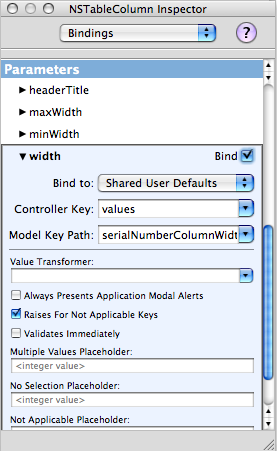 So all you need to do is select the table column and go to the Bindings option in the IB Inspector. Select the width attribute. For this we'll bind to Shared User Defaults (once you select this you should see the “Shared Defaults” controller appear in the instances tab), with the controller key “values” and model key path “nameColumnHeaderWidth” for the name column. Repeat the process for each additional column (giving a unique name for each model key path) and now your app will remember the length of each column as you drag them!
It's the nice little stuff like this that you do that your users will really appreciate when you put out your app.
So all you need to do is select the table column and go to the Bindings option in the IB Inspector. Select the width attribute. For this we'll bind to Shared User Defaults (once you select this you should see the “Shared Defaults” controller appear in the instances tab), with the controller key “values” and model key path “nameColumnHeaderWidth” for the name column. Repeat the process for each additional column (giving a unique name for each model key path) and now your app will remember the length of each column as you drag them!
It's the nice little stuff like this that you do that your users will really appreciate when you put out your app.
Sunday, October 29, 2006
[Helpful App] AppKiDo
 After posting about Docoa browser a couple people suggested I try AppKiDo which looked like a decent alternative. After testing it out for a while I thought I'd post some thoughts about it.
Upon launching it, AppKiDo takes a minute and begins parsing your documentation files, unfortunately this happens EVERY time you launch it. Upon completing this the documentation browser is launched. Right away unfortunately I saw something that I wish was different, I'm sorry but the brushed metal interface should really be changed to a unified interface. I installed UNO to see how AppKiDo would look with a unified UI (yeah I know I could have probably edited the NIB file, but I was lazy here) and it definitely looks better.
AppKiDo has somewhat of an odd interface, on the left is a drawer and on the right is where you can see all the documentation and it's various attributes. The Quicklist (drawer) has some usefull attributes like allowing you to only view things like view subclasses, classes with delegates, window classes, etc. Additionally you can search for classes, methods, etc in this drawer as well.
The window itself has 3 components: (1) A Browser (optional – can be hidden) This allows you to browse up and down the various classes as well as protocols, functions,etc for specific frameworks like AppKit, Foundation, Core Data, etc. (2) Detail view – This shows you the list of functions, procols, etc of any object you have selected. It has one big advantage over Docoa Browser and Xcodes Documentation browser in that it can show you all methods for a particular class, not only the ones specifically for that class but ones that it has inherited which makes AppKiDo very powerful in this instance. (3) The Documentation Viewer itself shows you the documentation for whatever you are looking at.
Overall AppKiDo is very powerful and definitely a good documentation browser. Yet at the same time I find myself wanting to rearrange the interface, AppKiDo doesn't feel natural. I may not know what the right interface is, but at the same time I know when something is wrong. Some things like the fact that I can browse classes just for specific frameworks on the quicklist drawer, but can't do the same in the browser feels incredibly akward.
Don't get me wrong I feel AppKiDo is a very powerful application, I just feel like it's user interface is holding it back and when it's interface gets a overhaul it could very well be the perfect documentation browser.
AppKiDo can be downloaded from here: http://homepage.mac.com/aglee/downloads/appkido.html
UPDATE: One commenter informed me I indeed overlooked the preferences where the brushed metal UI can indeed to be turned off, still brushed metal really shouldn't be the default
After posting about Docoa browser a couple people suggested I try AppKiDo which looked like a decent alternative. After testing it out for a while I thought I'd post some thoughts about it.
Upon launching it, AppKiDo takes a minute and begins parsing your documentation files, unfortunately this happens EVERY time you launch it. Upon completing this the documentation browser is launched. Right away unfortunately I saw something that I wish was different, I'm sorry but the brushed metal interface should really be changed to a unified interface. I installed UNO to see how AppKiDo would look with a unified UI (yeah I know I could have probably edited the NIB file, but I was lazy here) and it definitely looks better.
AppKiDo has somewhat of an odd interface, on the left is a drawer and on the right is where you can see all the documentation and it's various attributes. The Quicklist (drawer) has some usefull attributes like allowing you to only view things like view subclasses, classes with delegates, window classes, etc. Additionally you can search for classes, methods, etc in this drawer as well.
The window itself has 3 components: (1) A Browser (optional – can be hidden) This allows you to browse up and down the various classes as well as protocols, functions,etc for specific frameworks like AppKit, Foundation, Core Data, etc. (2) Detail view – This shows you the list of functions, procols, etc of any object you have selected. It has one big advantage over Docoa Browser and Xcodes Documentation browser in that it can show you all methods for a particular class, not only the ones specifically for that class but ones that it has inherited which makes AppKiDo very powerful in this instance. (3) The Documentation Viewer itself shows you the documentation for whatever you are looking at.
Overall AppKiDo is very powerful and definitely a good documentation browser. Yet at the same time I find myself wanting to rearrange the interface, AppKiDo doesn't feel natural. I may not know what the right interface is, but at the same time I know when something is wrong. Some things like the fact that I can browse classes just for specific frameworks on the quicklist drawer, but can't do the same in the browser feels incredibly akward.
Don't get me wrong I feel AppKiDo is a very powerful application, I just feel like it's user interface is holding it back and when it's interface gets a overhaul it could very well be the perfect documentation browser.
AppKiDo can be downloaded from here: http://homepage.mac.com/aglee/downloads/appkido.html
UPDATE: One commenter informed me I indeed overlooked the preferences where the brushed metal UI can indeed to be turned off, still brushed metal really shouldn't be the default